The Gateway version 2 for the wireless sensor system ERBESSD INSTRUMENTS® PHANTOM®, and the DEFIANT™ wired monitor, embed a native OPC UA server. Every sensor appears as an object in the server address space, with its live measurements as OPC UA variables that any standard client — Ignition, Kepware, WinCC, FactoryTalk, Node-RED, UAExpert, opcua-asyncio — can browse, read, subscribe to and, for a few control points, write.
Because of how the OPC UA protocol works, the full time waveform and the FFT are not available over OPC UA. Use the MQTT integration for waveform data.
You can use the OPC UA server at the same time as all other protocols supported by the Gateway, including EI-Analytic™, EI Monitor, MQTT and Modbus.
Some of the options described here were added in later gateway releases. If you cannot find one in your admin console, update your gateway to the latest firmware.
Server capabilities at a glance
| Item | What the gateway provides |
|---|---|
| Role | OPC UA server. Clients connect in to the gateway. |
| Transport | OPC UA binary over TCP (opc.tcp://). HTTPS and OPC UA PubSub are not provided. |
| Port | 4334 (fixed). |
| Endpoint path | /UA/PhantomGW |
| Information model | OPC UA base nodeset 1.05, backward compatible with 1.04 and 1.03 clients. No companion specification (no DI, ADI, Machinery or MTConnect profiles). |
| Services | Browse, Read, Write, and Subscribe / MonitoredItems (Data Access). |
| Security policies | None, Basic128Rsa15, Basic256Sha256, Aes128_Sha256_RsaOaep, Aes256_Sha256_RsaPss. |
| Message security modes | None, Sign, SignAndEncrypt. |
| Hardened mode | Restricts the server to Aes128_Sha256_RsaOaep and Aes256_Sha256_RsaPss with SignAndEncrypt only. |
| User authentication | Anonymous (can be disabled) and username + password. |
| Sampling | minimumSamplingInterval of 1000 ms on every variable. |
| Historical access | Not supported. Use MQTT or EI-Analytic™ for history. |
| Waveforms / FFT | Not exposed over OPC UA. |
| Methods | None. Actions are exposed as writable Boolean variables instead. |
Enabling the OPC Server
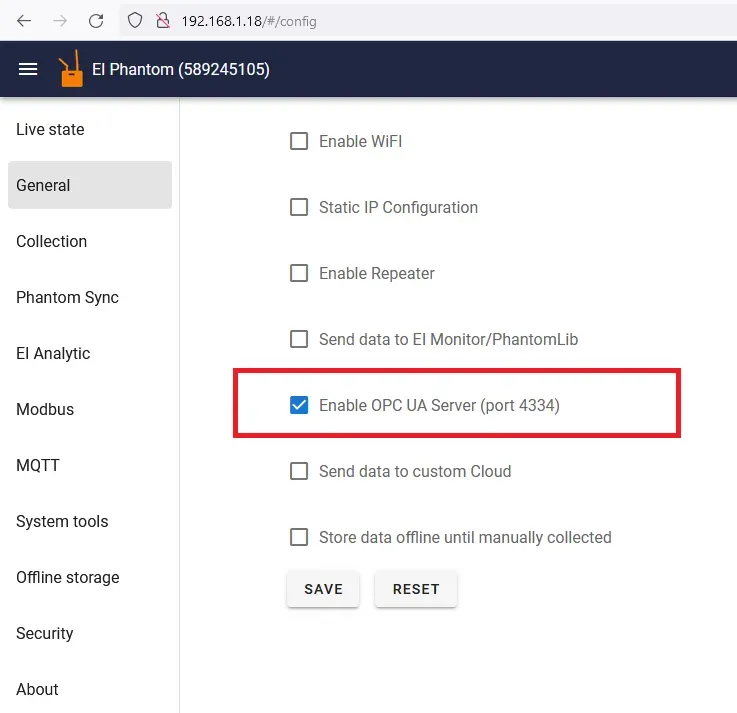
To enable the OPC UA server, in the Gateway 2 admin console, enable it in the General config page by clicking the “Enable OPC UA Server” checkbox. Click save and the Gateway will restart. After the Gateway restarts the OPC Server will be ready.
Endpoint URL
After the OPC UA server has been enabled you can access it with any OPC UA client using:
opc.tcp://192.168.1.2:4334/UA/PhantomGWwhere 192.168.1.2 is replaced by the IP address of your gateway. For a first connection use security mode None and security policy None.
The server publishes its endpoints under the hostname PhantomGW, and also advertises these alternate hostnames so a client that rewrites the endpoint URL after discovery can still reach it:
PhantomGW-<gatewaySerial>- the gateway current
eth0address, orwlan0when there is no wired address
Overriding the hostname
Some clients reject an endpoint whose hostname they cannot resolve. Tick Override OPC hostname and enter a Host name — a DNS name, or the fixed IP address of the gateway — to have the server advertise that name instead of PhantomGW.
Security profiles
Security policies and message modes
By default the server offers the complete set, so any client can connect regardless of what it supports:
| Security policy | Available message security modes |
|---|---|
None |
None |
Basic128Rsa15 |
Sign, SignAndEncrypt |
Basic256Sha256 |
Sign, SignAndEncrypt |
Aes128_Sha256_RsaOaep |
Sign, SignAndEncrypt |
Aes256_Sha256_RsaPss |
Sign, SignAndEncrypt |
Disable OPC UA unencrypted communication
Ticking Disable OPC UA unencrypted communication narrows the server down to the modern policies only:
| Security policy | Message security mode |
|---|---|
Aes128_Sha256_RsaOaep |
SignAndEncrypt |
Aes256_Sha256_RsaPss |
SignAndEncrypt |
None, Basic128Rsa15 and Basic256Sha256 are withdrawn, and the None and Sign-only modes are no longer offered. This is the recommended production setting. Basic128Rsa15 and Basic256Sha256 are deprecated by the OPC Foundation; leaving them enabled is only useful for older clients that cannot negotiate the AES policies.
Verify that your client supports
Aes128_Sha256_RsaOaeporAes256_Sha256_RsaPssbefore enabling this option — otherwise it will no longer be able to connect.
User authentication
Out of the box the server accepts anonymous sessions. You can lock this down in the same OPC config page:
| Option | Effect |
|---|---|
| Disable OPC UA Anonymous login | Rejects anonymous sessions. Every client must present a username and password. |
| Add user | Adds a username + password pair to the server user list. Add as many as you need; each can be removed later. |
| Export only paired sensors | Restricts the address space to paired sensors instead of every sensor the gateway can see. |
Users are defined per gateway. Combine Disable OPC UA Anonymous login with Disable OPC UA unencrypted communication so credentials are never sent over an unencrypted channel.
Address space
The OPC UA server is organized in a tree-like structure. Under the root folder there is an Objects folder, under which all the sensor serial numbers are shown. Under each serial number there is a number of different variables depending on the sensor type.
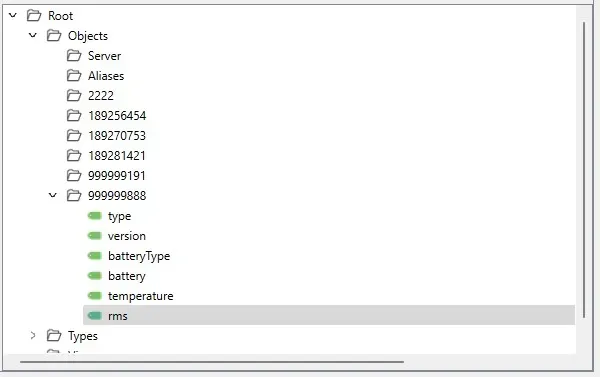
All nodes live in namespace index 1 and use string NodeIds.
Root
└── Objects
    ├── 40217                         ← wireless sensor, browse name = sensor serial
    │   ├── friendlyName              (String)
    │   ├── isPaired                  (Boolean)
    │   ├── type                      (UInt16)
    │   ├── version                   (UInt16)
    │   ├── battery                   (Double)
    │   ├── batteryType               (UInt32)
    │   ├── temperature               (Double)
    │   ├── rms                       (Double[3])
    │   ├── rms_element0..2           (Double)
    │   ├── arms                      (Double[3])
    │   ├── arms_element0..2          (Double)
    │   ├── sensorActions
    │   │   ├── triggerCollection     (Boolean, writable)
    │   │   └── triggerStateUpdate    (Boolean, writable)
    │   └── extendedMetrics           (triaxial sensors only)
    │       ├── 0                     ← X axis
    │       ├── 1                     ← Y axis
    │       └── 2                     ← Z axis
    └── WiredCH1                      ← DEFIANT™ wired channel
        ├── accel_rms                 (Double)
        ├── velocity_rms              (Double)
        └── …
NodeId scheme
Every node has a deterministic string NodeId, so you can address a tag directly without browsing:
| Node | NodeId |
|---|---|
| Sensor object | ns=1;s=ph<phantomCode> |
| Sensor variable | ns=1;s=ph<phantomCode>-<browseName> |
| Array element | ns=1;s=ph<phantomCode>-<browseName>_element<index> |
| Friendly name | ns=1;s=ph<phantomCode>-friendlyName |
| Paired state | ns=1;s=ph<phantomCode>-isPaired |
| Actions folder | ns=1;s=ph<phantomCode>-actions |
| Trigger collection | ns=1;s=ph<phantomCode>-actions-triggerCollection |
| Trigger state update | ns=1;s=ph<phantomCode>-actions-triggerStateUpdate |
| Extended metrics folder | ns=1;s=ph<phantomCode>-ext |
| Extended metrics axis | ns=1;s=ph<phantomCode>-ext-ch<axis> |
| Extended metric | ns=1;s=ph<phantomCode>-ext-ch<axis>-<metric> |
| Wired channel object | ns=1;s=wired<n> |
| Wired channel variable | ns=1;s=wired<n>-<browseName> |
For sensor 40217, the velocity RMS on the Z axis is ns=1;s=ph40217-rms_element2, and the whole velocity RMS array is ns=1;s=ph40217-rms.
Arrays are published twice. Every array variable (
rms,arms,tcTemperature,voltage,instCurrent,dryContactsState, …) is exposed both as a single array node and as one scalar node per element, suffixed_element0,_element1, … Use the array node when your client handles arrays; use the_elementNnodes when it expects one tag per value, which is what most PLC and SCADA tag browsers assume.
Timestamps and sampling
Every measurement variable reports a sourceTimestamp and a serverTimestamp set to the moment the gateway last received an update from that sensor. Comparing that timestamp with the current time is the reliable way to detect a sensor that has stopped reporting — the value itself simply keeps its last reading.
All variables declare a minimumSamplingInterval of 1000 ms. Requesting a faster publishing interval on a subscription will not produce new data: wireless sensors advertise on their own configured interval, typically seconds to minutes.
Which sensors appear
By default every sensor the gateway sees is exported, paired or not. Tick Export only paired sensors to restrict the address space to paired sensors. Nodes are added and removed live as sensors are paired, unpaired, discovered or forgotten — no gateway restart is needed. The isPaired Boolean lets a client that exports everything filter for itself.
Variables
The type variable will contain the type of the sensor according to the following table:
| Sensor code | Sensor type |
|---|---|
| 3 | Triaxial accelerometer (KX222, high range) |
| 5 | Triaxial accelerometer (KX122, low range) |
| 6 | Triaxial accelerometer (KX134) |
| 7 | Triaxial universal (vibration + thermocouple + current) |
| 8 | Triaxial PHANTOM® Gen 4, high range |
| 9 | Triaxial PHANTOM® Gen 4, low range |
| 10 | Thermal camera |
| 12 | Repeater |
| 14 | PHANTOM® MAX, high range |
| 15 | PHANTOM® MAX, low range |
| 20 | Thermocouple |
| 21 | Thermocouple v2 |
| 22 | Thermocouple v3 |
| 25 | Infrared temperature |
| 26 | 4-20mA input |
| 27 | Voltmeter (0-10 VDC) |
| 30 | Current module v1 |
| 31 | Dry contact inputs |
| 32 | Current module v2 (4 channel) |
| 40 | Speed / RPM |
| 50 | Distance |
| 60 | General purpose (GP) node |
| 202 | Display |
Common Variables for All Sensors
| Variable name | OPC UA data type | Description |
|---|---|---|
friendlyName |
String |
Name set in the console. Falls back to the sensor serial number. |
isPaired |
Boolean |
true when the sensor is paired to this gateway. |
type |
UInt16 |
Type of the sensor according to the table above. |
version |
UInt16 |
Sensor firmware version. |
battery |
Double |
Battery voltage in volts. |
batteryType |
UInt32 |
Battery type. See the battery table below. |
temperature |
Double |
Internal temperature of the sensor in Celsius. |
Battery types:
batteryType |
Battery |
|---|---|
| 1 | ⅙ D |
| 2 | AAA |
| 3 | CR2032 |
| 4 | CR2477 |
| 5 | AA |
| 6 | D |
Triaxial Accelerometer (3, 5, 6, 8 and 9)
| Variable name | OPC UA data type | Description |
|---|---|---|
rms |
Double[3] |
Velocity RMS in mm/s corresponding to each axis (X, Y, Z). |
arms |
Double[3] |
Acceleration RMS in g corresponding to each axis (X, Y, Z). |
PHANTOM® MAX (14 and 15)
| Variable name | OPC UA data type | Description |
|---|---|---|
rms |
Double[3] |
Velocity RMS in mm/s per axis. |
arms |
Double[3] |
Acceleration RMS in g per axis. |
magneticspeed |
Double |
Magnetically derived running speed, in Hz. |
Triaxial Universal (7)
| Variable name | OPC UA data type | Description |
|---|---|---|
rms |
Double[3] |
Velocity RMS in mm/s per axis. |
tcTemperature |
Double[] |
Thermocouple temperature per channel, in Celsius. |
instCurrent |
Double[] |
Instantaneous current per channel, in amps. |
averageCurrent |
Double[] |
Average current in the update period, per channel. |
minCurrent |
Double[] |
Lowest current in the update period, per channel. |
maxCurrent |
Double[] |
Highest current in the update period, per channel. |
accumulatedCurrent |
Double[] |
Accumulated current since the last reset, per channel. |
accumulatedStart |
UInt32 |
Start of the accumulation window, epoch seconds. |
accumulatedEnd |
UInt32 |
End of the accumulation window, epoch seconds. |
Thermal camera (10)
| Variable name | OPC UA data type | Description |
|---|---|---|
avgImageTemperature |
Double |
Average temperature of the image, in Celsius. |
The thermal image itself is not published over OPC UA. Use MQTT.
Thermocouple Temperature (20, 21 and 22)
| Variable name | OPC UA data type | Description |
|---|---|---|
tcTemperature |
Double[] |
Temperature of each thermocouple channel, in Celsius. |
Infrared Temperature (25)
| Variable name | OPC UA data type | Description |
|---|---|---|
ambientTemperature |
Double |
Ambient temperature as measured by the infrared sensor, in Celsius. |
objectTemperature |
Double |
Temperature of the object the sensor points at, in Celsius. |
emissivity |
Double |
Emissivity configured for the target object. |
4-20mA Sensor (26) and Voltmeter (27)
| Variable name | OPC UA data type | Description |
|---|---|---|
voltage |
Double[] |
Measured voltage per channel, in volts. |
Current module (30 and 32)
| Variable name | OPC UA data type | Description |
|---|---|---|
instCurrent |
Double[] |
Instantaneous current for each of the four channels of the sensor, in amps. |
averageCurrent |
Double[] |
Average current in the update period for each channel, in amps. |
minCurrent |
Double[] |
Minimum current in the update period for each channel, in amps. |
maxCurrent |
Double[] |
Maximum current in the update period for each channel, in amps. |
accumulatedCurrent |
Double[] |
Accumulated current since the last reset for each channel. |
accumulatedStart |
UInt32 |
Start of the accumulation window, epoch seconds. |
accumulatedEnd |
UInt32 |
End of the accumulation window, epoch seconds. |
currentProbeType |
UInt16[] |
Probe type configured on each channel. |
currentOffsets |
Double[] |
Calibration offset applied to each channel. |
currentMultiplier |
Double[] |
Calibration multiplier applied to each channel. |
Dry Contacts Sensor (31)
| Variable name | OPC UA data type | Description |
|---|---|---|
dryContactsState |
Boolean[] |
State of each input. true means the contact is closed, false means open. |
Velocity (RPM) Sensor (40)
| Variable name | OPC UA data type | Description |
|---|---|---|
rpm |
Double |
Current RPM speed. |
Distance (50)
| Variable name | OPC UA data type | Description |
|---|---|---|
distance |
UInt16 |
Measured distance, in mm. |
General purpose node (60)
| Variable name | OPC UA data type | Description |
|---|---|---|
rms |
Double[] |
RMS value per axis. Velocity in mm/s, or acceleration in g, per configuration. |
Repeater (12)
Only type and version are published.
Extended metrics (triaxial sensors)
When a triaxial sensor delivers a full waveform, the gateway computes per-axis statistics from it and publishes them under extendedMetrics, in sub-objects named 0 (X), 1 (Y) and 2 (Z):
| Metric | Units | Description |
|---|---|---|
vrms |
mm/s | Velocity RMS computed from the waveform (10-1000 Hz). |
arms |
g | Acceleration RMS across the full spectrum. |
apeak |
g | Acceleration peak. |
acf |
— | Acceleration crest factor (apeak / arms). |
highfreq |
g | Acceleration RMS in the 5-10 kHz band. |
maxfreq |
Hz | Frequency of the highest spectral peak. |
dcoffset |
g | DC component of the signal. |
These nodes appear the first time a waveform is collected from that sensor, and their timestamps reflect the last waveform, not the last state update.
Sensor actions (writable variables)
Each sensor object carries a sensorActions folder with writable Boolean variables. Writing to one queues the corresponding action on the gateway; the value read back tells you whether an action is currently pending.
| Variable | Available on | Effect when written |
|---|---|---|
triggerCollection |
Triaxial, GP and thermal camera sensors | Requests a full waveform or thermal image collection on the next contact. |
triggerStateUpdate |
All sensors | Requests an immediate state update, on sensors that support forced updates. |
For example, writing true to ns=1;s=ph40217-actions-triggerCollection triggers a collection on sensor 40217. The resulting waveform is not returned over OPC UA: it is stored and forwarded to EI-Analytic™, EI Monitor and/or MQTT according to your configuration.
DEFIANT™ wired channels
On a DEFIANT™, each wired channel is added as an object named WiredCH1, WiredCH2, … with the overalls computed for that channel as Double variables. The object browse name and its NodeId are 1-based (WiredCH1 is the first channel, ns=1;s=wired1).
| Group | Browse names |
|---|---|
| Acceleration | accel_rms, accel_truepeak, accel_peaktopeak, accel_lowfreq, accel_medfreq, accel_highfreq, accel_kurtosis, accel_skewness |
| Velocity | velocity_rms, velocity_truepeak, velocity_peaktopeak, velocity_lowfreq, velocity_medfreq, velocity_highfreq, velocity_kurtosis, velocity_skewness |
| Acceleration envelope | gE, ge_truepeak, ge_peaktopeak, ge_lowfreq, ge_medfreq, ge_highfreq, ge_kurtosis, ge_skewness |
| Displacement | displacement_rms, displacement_truepeak, displacement_peaktopeak, displacement_offset |
| Speed | rpm |
| Analog / discrete | voltage_discrete, voltage_average, discrete_value |
| Cross-channel phase | phase_channel_1 … phase_channel_16 |
Connecting: worked examples
UAExpert
- Server → Add → Custom Discovery → Double click to add server.
- Enter
opc.tcp://192.168.1.2:4334/UA/PhantomGW. - Expand the discovered server and pick the endpoint: None / None for a first test, or Aes256_Sha256_RsaPss / Sign & Encrypt in production.
- If you disabled anonymous login, set Authentication Settings → Username and enter the credentials you created in the console.
- Trust the gateway certificate when prompted, then connect and browse Objects.
Python (opcua-asyncio)
import asyncio
from asyncua import Client

URL = "opc.tcp://192.168.1.2:4334/UA/PhantomGW"

async def main():
    async with Client(url=URL) as client:
        # Read the whole velocity RMS array
        rms = await client.get_node("ns=1;s=ph40217-rms").read_value()
        print("velocity RMS x/y/z (mm/s):", rms)

        # Read a single axis
        rms_z = await client.get_node("ns=1;s=ph40217-rms_element2").read_value()
        print("velocity RMS Z (mm/s):", rms_z)

        # Read the value together with its source timestamp
        dv = await client.get_node("ns=1;s=ph40217-temperature").read_data_value()
        print("temperature:", dv.Value.Value, "at", dv.SourceTimestamp)

asyncio.run(main())
With authentication and encryption enabled:
client = Client(url=URL)
client.set_user("scada")
client.set_password("your-password")
await client.set_security_string(
    "Aes256Sha256RsaPss,SignAndEncrypt,client-cert.der,client-key.pem"
)
Subscribing instead of polling
Because every variable declares a 1000 ms minimum sampling interval, request a publishing interval of 1000 ms or slower. A faster interval is accepted but yields no extra data.
class Handler:
    def datachange_notification(self, node, value, data):
        print(node, value, data.monitored_item.Value.SourceTimestamp)

sub = await client.create_subscription(1000, Handler())
await sub.subscribe_data_change(client.get_node("ns=1;s=ph40217-rms_element2"))
Troubleshooting
| Symptom | Cause and fix |
|---|---|
| Client cannot discover any endpoint | Confirm the server is enabled and the gateway restarted; check that TCP 4334 is reachable. |
| Discovery succeeds, connection fails | The client is rewriting the endpoint to a hostname it cannot resolve. Enable Override OPC hostname and set a resolvable name or the gateway IP. |
BadSecurityPolicyRejected or no compatible endpoint |
Disable OPC UA unencrypted communication is on and your client does not support the AES policies. Use a client that supports them, or turn the option off. |
BadIdentityTokenRejected |
Anonymous login is disabled. Supply one of the username/password pairs defined in the console. |
| A sensor is missing from the tree | Export only paired sensors is on and the sensor is not paired, or the gateway has not seen it yet. Check isPaired. |
| Values never change | The sensor update interval is longer than your polling period, or the sensor stopped reporting. Compare sourceTimestamp with the current time. |