Learn how to create the connection between MQTT and the most powerful gateway.
PHANTOM® Gateway 2.0 MQTT Support
The Gateway 2.0 used in the wireless sensor system ERBESSD INSTRUMENTS® PHANTOM®, and the DEFIANT™ wired monitor, support the MQTT IoT protocol. All sensor data is available through MQTT, including temperature, RPM, frequency bands and wired channel overalls, as well as full time waveforms from vibration sensors (the FFT must be processed by the user from the TWF).
The gateway acts as an MQTT client that will connect to an MQTT broker of your choice, and publishes everything it collects as plain, self-describing JSON.
You can use the MQTT support at the same time as all other protocols supported by the Gateway, including EI-Analytic™, EI Monitor, OPC UA and Modbus.
Some of the options described here were added in later gateway releases. If you cannot find one in your admin console, update your gateway to the latest firmware.
Protocol support at a glance
| Item | What the gateway does |
|---|---|
| Role | MQTT client. The gateway connects out to your broker, so no inbound firewall rule is needed. |
| MQTT version | MQTT 3.1.1 (protocol level 4). Any MQTT 3.1.1 or MQTT 5.0 broker accepts the connection, because 5.0 brokers are backward compatible with 3.1.1 clients. |
| Transports | mqtt:// (plain TCP), mqtts:// (TLS), ws:// (WebSocket), wss:// (WebSocket over TLS). |
| Port | Free choice, 1-65535. Defaults to 1883. |
| QoS | 0, 1 or 2, selectable independently for publishing and for the management subscription. |
| Authentication | Anonymous, or username + password. Optional mutual TLS with an X.509 client certificate. |
| Client ID | PhantomGW-<gatewaySerial> by default; can be set to any value you choose. |
| Payload format | Open UTF-8 JSON. Optionally gzip-compressed. No binary or proprietary encoding on the wire. |
| Local broker | Optional embedded broker on port 1883 (PHANTOM® Gateway hardware only). |
| Reconnection | Automatic, retried every 10 s. Waveforms that fail to publish are retried from the gateway offline storage. |
| Reverse channel | Optional. The gateway can subscribe to a management topic and accept the full Gateway Management API over MQTT. |
Enabling MQTT Support
To enable the MQTT support in the Gateway 2.0 admin console, you need to activate it in the MQTT config page by clicking the “Enable MQTT connection” checkbox.
Then fill your MQTT broker options accordingly. We support the following protocols for connecting to the MQTT broker:
- mqtt://
- mqtts:// (encrypted)
- ws:// (websocket)
- wss:// (websocket encrypted)
You need to enter your MQTT broker hostname/IP address, the port, and optionally the user name and password for authentication.
If you wish to receive full time waveforms from vibration sensors please mark the corresponding checkbox. Time waveforms are large messages, so if you are not intending to use them you may leave the option unchecked.
The “Allow Gateway management though MQTT” option allows you to use the full management API to control the gateway and its sensors using the MQTT connection.
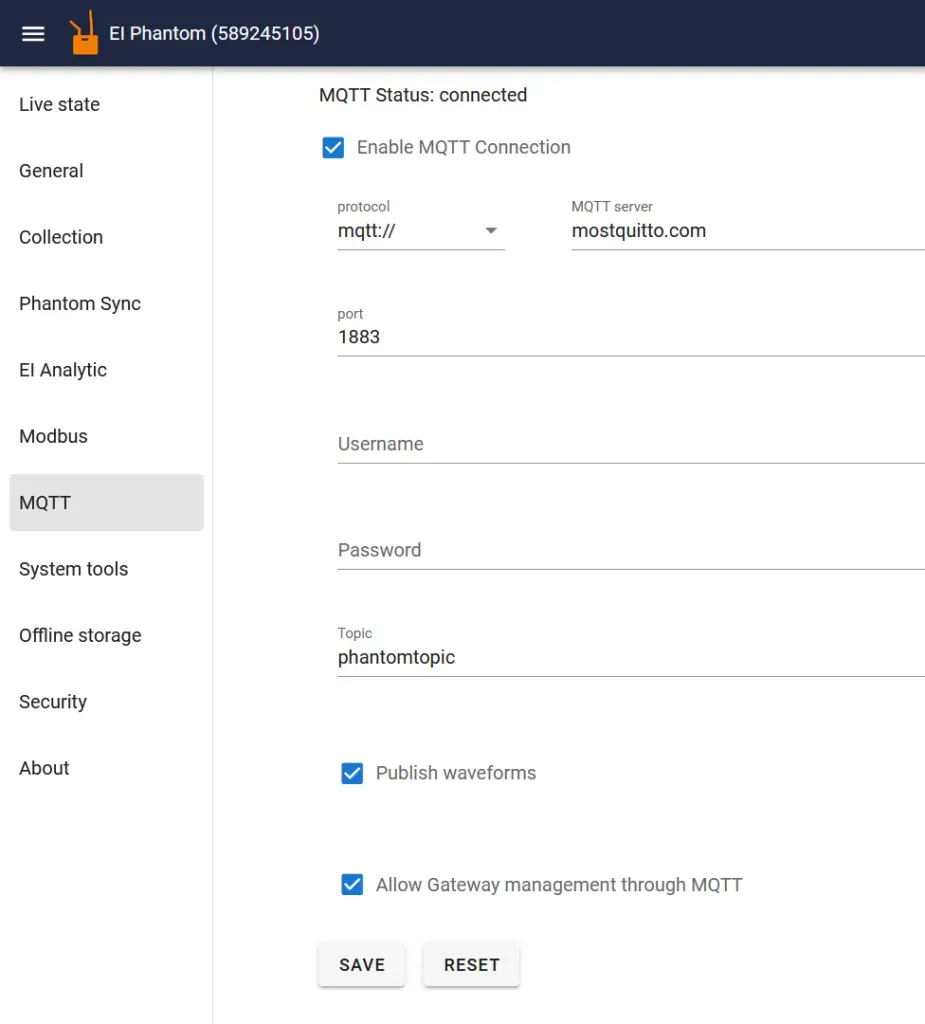
After you save the settings the Gateway 2.0 will restart. After it restarts it will try to connect to the MQTT broker and show a state on the same MQTT section at the top if there are any issues: connecting, connected, reconnecting, closed or error, including the broker error message when a connection is refused.
Field reference
| Field | Description |
|---|---|
| Protocol | mqtt://, mqtts://, ws:// or wss://. |
| MQTT server | Hostname or IP address of your broker. |
| Port | Broker port. 1883 plain, 8883 TLS, 443/8083 WebSocket are the usual choices. |
| Certificate validation | Shown for mqtts:// and wss:// only. See the security section below. |
| CA certificate (PEM format) | Paste your own CA when validation is set to Custom CA. |
| Username / Password | Leave both empty for an anonymous connection. |
| Publish Topic | Base topic for every published message. Required. |
| Client Id | Overrides the default PhantomGW-<serial>. Leave empty to keep the default. |
| Publish QoS | 0, 1 or 2. |
| Append gateway and sensor serial number as subtopics | Turns the flat base topic into a per-sensor topic tree. See the topic section below. |
| Publish vibration waveforms & thermal images | Enables the large collection messages. Off by default. |
| Send wired channels overalls | DEFIANT™ only: Never, As fast as possible, or Timeout. |
| Wired overall send timeout | DEFIANT™ only, when cadence is Timeout: minimum seconds between publishes per channel (1-216000). |
| Compress (gzip) payload | gzip-compresses every payload. |
| Allow Gateway management through MQTT | Subscribes to a command topic. See the management section below. |
| Subscribe topic | Topic the gateway listens on when management is enabled. |
| Subscribe QoS | QoS used for that subscription. |
| Client Certificate / Client Key (PEM format) | Under Advanced, for mqtts:// and wss:// only. Enables mutual TLS. |
Security: TLS and authentication
Select mqtts:// or wss:// to encrypt the link. The Certificate validation selector controls how the broker certificate is verified:
| Mode | Behaviour | When to use |
|---|---|---|
| Skip certificate validation (insecure) | The certificate is not verified. The channel is encrypted but the broker identity is not authenticated. | Bench and lab testing only. |
| Validate against included CA list | Standard verification against the public CA bundle shipped with the gateway. | Public cloud brokers (AWS IoT Core, Azure, HiveMQ Cloud, EMQX Cloud, …). |
| Custom CA | Verified against a CA certificate you paste in PEM format. | Private or self-signed PKI, on-premise brokers. |
The Advanced panel accepts a client certificate and its private key, both in PEM format, used only with mqtts:// or wss://. This is what brokers that require X.509 device identity, such as AWS IoT Core, expect.
Username and password travel in the MQTT CONNECT packet. Over mqtt:// or ws:// they are sent in clear text, so always pair credentials with mqtts:// or wss://.
The on-gateway MQTT broker
PHANTOM® Gateway hardware can also run its own embedded MQTT broker, so a PLC, SCADA or edge application on the same network can subscribe directly to the gateway with no external infrastructure. It is not available on the USB/PC gateway. Enable it with Enable local MQTT broker.
| Property | Value |
|---|---|
| Listener | 1883, all interfaces |
| Authentication | None (anonymous) |
| TLS | Not available on the local broker |
| Persistence | Disabled, messages are not stored across reboots |
The local broker has its own Publish Topic, Append serial switch, waveform switch, compression switch and management switch, independent from the remote broker settings. Both can run at once: the same reading is then published to your remote broker and to the local one.
mosquitto_sub -h <gateway-ip> -p 1883 -t "phantom/#" -vBecause the local broker is unauthenticated, keep it on a trusted OT network segment.
Topic structure
With Append gateway and sensor serial number as subtopics disabled, every message is published on the base Publish Topic exactly as typed.
With it enabled, the gateway builds a topic tree. Using a base topic of phantom, a gateway serial of EIGW12345 and a sensor serial (phantomCode) of 40217:
| Message | Topic | dataType |
|---|---|---|
| Sensor state update | phantom/EIGW12345/40217/stateupdate |
stateupdate |
| Frequency bands update | phantom/EIGW12345/40217/bands |
bandsUpdate |
| Waveform / thermal image | phantom/EIGW12345/40217/collection |
collection |
| Wired channel overalls (DEFIANT™) | phantom/EIGW12345/WIRED0/stateupdate |
wiredOveralls |
| Wired channel waveform (DEFIANT™) | phantom/EIGW12345/<serial>/collection |
wiredCollection |
| Modbus / custom unit tags | phantom/EIGW12345/customunits |
customUnitStateUpdate |
| Management API replies | phantom/EIGW12345 |
(varies) |
Subscribe to everything with phantom/#, to one gateway with phantom/EIGW12345/#, or to one sensor with phantom/EIGW12345/40217/#.
Always branch on the
dataTypefield rather than on the topic. When Append serial is off, every message type arrives on the same topic.
Payload format
The Gateway will start publishing messages every time a sensor updates its data (in its own internal update interval) or when a time waveform measurement is taken. The messages are UTF-8 JSON objects, one object per message. Nothing is binary, proprietary or schema-registry dependent: you can consume them with JSON.parse, json.loads, a Node-RED json node, the Telegraf json_v2 parser, or any SCADA JSON tag reader.
Two rules apply to every message:
- Fields a given sensor or firmware does not report are omitted, not sent as
null. Read defensively. timestampis Unix epoch time in seconds, not milliseconds.
Common Variables for All Sensors
| Variable Name | Description |
|---|---|
| dataType | Message discriminator: stateupdate, bandsUpdate, collection, wiredOveralls, wiredCollection or customUnitStateUpdate. collection refers to time waveforms and thermal images; every other sensor update is stateupdate. |
| type | Sensor type (see table below). |
| phantomCode | Sensor’s serial number. Note: vibration collection messages use serialNumber instead. |
| gwSerial | Gateway’s serial number. |
| timestamp | The time in seconds since 1970 when this measurement was taken. |
| friendlyName | The name given to the sensor in the console. Omitted when none is set. |
| seq | Sensor update sequence counter. Wraps at 255; a jump means advertisements were missed over the air. |
| battery | Battery voltage in volts. |
| batteryType | Battery type (see table below). |
| temperature | Sensor’s internal temperature (in Celsius). |
| updateInterval | The sensor’s configured update interval, in seconds. |
| txPower | Radio transmit power, in dBm. |
| advFlags | Bit field with the sensor’s internal advertising flags. |
| version | Firmware version. |
| rssi | Sensor’s signal strength, in dBm (stateupdate only). |
| Sensor code | Sensor type |
|---|---|
| 3 | Triaxial accelerometer (KX222, high range) |
| 5 | Triaxial accelerometer (KX122, low range) |
| 6 | Triaxial accelerometer (KX134) |
| 7 | Triaxial universal (vibration + thermocouple + current) |
| 8 | Triaxial PHANTOM® Gen 4, high range |
| 9 | Triaxial PHANTOM® Gen 4, low range |
| 10 | Thermal camera |
| 12 | Repeater |
| 14 | PHANTOM® MAX, high range |
| 15 | PHANTOM® MAX, low range |
| 20 | Thermocouple |
| 21 | Thermocouple v2 |
| 22 | Thermocouple v3 |
| 25 | Infrared temperature |
| 26 | 4-20mA sensor’s node |
| 27 | Voltmeter (0-10 VDC) |
| 30 | Current module v1 |
| 31 | Dry contact |
| 32 | Current module v2 (4 channel) |
| 40 | Velocity (RPM module) |
| 50 | Distance |
| 60 | General purpose module |
| 202 | Display |
| batteryType | Battery |
|---|---|
| 1 | ⅙ D |
| 2 | AAA |
| 3 | CR2032 |
| 4 | CR2477 |
| 5 | AA |
| 6 | D |
The following are the properties included for each sensor type.
Triaxial Accelerometer (3, 5, 6, 8 and 9)
| Variable Name | Description |
|---|---|
| rms | Three float array with the Velocity RMS in mm/s corresponding to each axis. |
| arms | Three float array with the Acceleration RMS in g corresponding to each axis. |
| minRMSFreq | Lower limit of the velocity RMS band, in Hz. |
| maxRMSFreq | Upper limit of the velocity RMS band, in Hz. |
| minRMSFreqAccel | Lower limit of the acceleration RMS band, in Hz. |
| maxRMSFreqAccel | Upper limit of the acceleration RMS band, in Hz. |
| range | Accelerometer full-scale range currently configured, in g. |
| magneticspeed | PHANTOM® MAX (14 and 15) only: magnetically derived running speed, in Hz. |
Example stateupdate message:
{
  "rssi": -63,
  "type": 6,
  "version": 195,
  "phantomCode": 40217,
  "gwSerial": "EIGW12345",
  "timestamp": 1756231043,
  "dataType": "stateupdate",
  "friendlyName": "Pump 3 - Motor DE",
  "seq": 184,
  "advFlags": 0,
  "batteryType": 1,
  "battery": 3.61,
  "temperature": 41.25,
  "updateInterval": 300,
  "txPower": 4,
  "minRMSFreq": 10,
  "maxRMSFreq": 1000,
  "rms": [1.42, 0.88, 2.07],
  "range": 16,
  "recordingSettings": 3,
  "minRMSFreqAccel": 1000,
  "maxRMSFreqAccel": 10000,
  "arms": [0.412, 0.298, 0.677]
}
Triaxial Accelerometer for dataType “collection”
| Variable Name | Description |
|---|---|
| serialNumber | Sensor’s serial number. This message uses serialNumber, not phantomCode. |
| sampleRate | The sample rate at which this measurement was taken, in Hz. |
| data | This will contain the time wave form data. It contains three arrays, one for each axis. Two of the axis arrays may be empty if a single axis mode was selected. The numbers in the array are in G’s (9.8 m/s²). |
| isAlarm | true when the recording was triggered by an alarm condition. |
| rpm | Running speed at capture time. Omitted when not available. |
| temperature | Sensor internal temperature at capture, in Celsius. Reported by sensors that measure it. |
{
  "serialNumber": 40217,
  "sampleRate": 3200,
  "gwSerial": "EIGW12345",
  "timestamp": 1756231043,
  "type": 6,
  "dataType": "collection",
  "friendlyName": "Pump 3 - Motor DE",
  "isAlarm": false,
  "rpm": 1478,
  "temperature": 41.25,
  "data": [
    [0.0123, -0.0044, 0.0187],
    [0.0091, 0.0102, -0.0058],
    [-0.021, 0.0176, 0.0031]
  ]
}
The three sample arrays are truncated in this example; a real message carries the full record. Samples per axis is data[n].length, and record duration in seconds is data[n].length / sampleRate.
Frequency bands message (dataType “bandsUpdate”)
Triaxial sensors that advertise extended band data publish a bandsUpdate alongside the state update.
| Variable Name | Description |
|---|---|
| rpmMin / rpmMax | Running speed window the bands were evaluated against. |
| bands[].min / .max | Band limits, expressed in unit: hz (integers) or orders (one decimal). |
| bands[].measurement | velocity or acceleration. |
| bands[].output | Detector applied to the band (rms, peak, …). |
| bands[].values | Per-axis result, { x, y, z }. |
| bands[].valueUnit | mm/s for velocity bands, mg for acceleration bands. |
{
  "dataType": "bandsUpdate",
  "serialNumber": 40217,
  "phantomCode": 40217,
  "type": 6,
  "version": 195,
  "gwSerial": "EIGW12345",
  "timestamp": 1756231043,
  "seq": 184,
  "rpmMin": 1450,
  "rpmMax": 1495,
  "bands": [
    {
      "min": 1.0,
      "max": 2.5,
      "measurement": "velocity",
      "unit": "orders",
      "output": "rms",
      "values": { "x": 1.12, "y": 0.74, "z": 1.88 },
      "valueUnit": "mm/s"
    }
  ]
}
Thermal camera message (10)
For dataType: "stateupdate" the camera reports avgImageTemperature, the average image temperature in Celsius.
For dataType: "collection" the full image is published:
| Variable Name | Description |
|---|---|
| columns | Image width in pixels. |
| rows | Image height in pixels. |
| frames | Number of frames in the message. |
| frameRate | Capture frame rate. |
| data | Array of frames images; each image is an array of rows rows; each row holds columns temperatures in Celsius. |
{
  "phantomCode": 60912,
  "serialNumber": 60912,
  "gwSerial": "EIGW12345",
  "timestamp": 1756231400,
  "type": 10,
  "dataType": "collection",
  "columns": 32,
  "rows": 24,
  "frames": 1,
  "frameRate": 1,
  "data": [
    [
      [24.31, 24.55, 25.02],
      [24.28, 24.61, 25.14]
    ]
  ]
}
Thermocouple temperature node message (20, 21 and 22)
| Variable Name | Description |
|---|---|
| tcTemperature | Three float array with the temperature of each thermocouple channel in celsius. |
Infrared temperature node message (25)
| Variable Name | Description |
|---|---|
| ambientTemperature | Ambient temperature as measured by the infrared sensor in celsius. |
| objectTemperature | Temperature of the object the infrared sensor points at, in celsius. |
| emissivity | Emissivity configured for the target object. |
4-20mA sensor (26) and Voltmeter (27)
| Variable Name | Description |
|---|---|
| voltage | A float array of size 4 with the voltage 4-20mA sensor. |
Velocity (RPM) sensor (40)
| Variable Name | Description |
|---|---|
| rpm | Float value with the current RPM speed. |
| rpmTimeout | Seconds without a pulse after which the sensor reports zero speed. |
Distance sensor (50)
| Variable Name | Description |
|---|---|
| distance | Measured distance, in mm. |
General purpose module (60)
| Variable Name | Description |
|---|---|
| rms | Float array with the RMS per axis. Velocity in mm/s, or acceleration in g, per gpFlags. |
| sensitivity | Configured probe sensitivity, in mV/g. |
| gpFlags | Bit field. Bit 0 selects whether rms is a velocity or an acceleration measurement. |
Current sensor (30 and 32)
| Variable Name | Description |
|---|---|
| instCurrent | A float array size 4 with the Instantaneous current for each of the four channels of the sensor in amps. |
| averageCurrent | A float array size 4 with the Average current for each of the four channels of the sensor in amps. |
| minCurrent | A float array size 4 with the minimum current for each of the four channels of the sensor in amps. |
| maxCurrent | A float array size 4 with the maximum current for each of the four channels of the sensor in amps. |
| accumulatedCurrent | A float array size 4 with the accumulated current for each of the four channels of the sensor. |
| accumulatedStart | Start of the accumulation window, in seconds since 1970. |
| accumulatedEnd | End of the accumulation window, in seconds since 1970. |
| currentProbeType | Probe type configured on each channel. |
| currentOffsets | Calibration offset applied to each channel. |
| currentMultiplier | Calibration multiplier applied to each channel. |
{
  "dataType": "stateupdate",
  "type": 32,
  "phantomCode": 51844,
  "gwSerial": "EIGW12345",
  "timestamp": 1756231102,
  "rssi": -71,
  "version": 118,
  "battery": 3.58,
  "batteryType": 4,
  "temperature": 33.1,
  "instCurrent": [12.4, 12.1, 12.8, 0.0],
  "averageCurrent": [12.3, 12.0, 12.7, 0.0],
  "minCurrent": [11.9, 11.6, 12.2, 0.0],
  "maxCurrent": [13.1, 12.9, 13.4, 0.0],
  "accumulatedCurrent": [842.5, 838.1, 851.9, 0.0],
  "accumulatedStart": 1753553200,
  "accumulatedEnd": 1756231102
}
Dry contacts Sensor (31)
| Variable Name | Description |
|---|---|
| dryContactsState | A boolean array size 4 with the state of the input. True means the contact is closed and false means open. |
| debounce | Debounce time applied to the inputs. |
DEFIANT™ wired channels
Wired channel overalls are published according to the Send wired channels overalls cadence (Never, As fast as possible, or throttled by Wired overall send timeout). wiredChannel is 1-based in the payload, and only the overalls actually computed for that channel are included.
{
  "dataType": "wiredOveralls",
  "wiredChannel": 1,
  "gwSerial": "EIDF98765",
  "timestamp": 1756231500,
  "sensorType": "accelerometer",
  "friendlyName": "Fan 12 - Inboard",
  "accel_rms": 0.482,
  "velocity_rms": 2.14,
  "displacement_rms": 18.7,
  "gE": 0.93,
  "rpm": 1786,
  "accel_truepeak": 1.84,
  "accel_peaktopeak": 3.52,
  "accel_kurtosis": 3.11
}
Available keys:
| Group | Keys |
|---|---|
| Acceleration | accel_rms, accel_truepeak, accel_peaktopeak, accel_lowfreq, accel_medfreq, accel_highfreq, accel_kurtosis, accel_skewness |
| Velocity | velocity_rms, velocity_truepeak, velocity_peaktopeak, velocity_lowfreq, velocity_medfreq, velocity_highfreq, velocity_kurtosis, velocity_skewness |
| Acceleration envelope | gE, ge_truepeak, ge_peaktopeak, ge_lowfreq, ge_medfreq, ge_highfreq, ge_kurtosis, ge_skewness |
| Displacement | displacement_rms, displacement_truepeak, displacement_peaktopeak, displacement_offset |
| Speed | rpm |
| Analog / discrete | voltage_discrete, voltage_average, discrete_value |
| Cross-channel phase | phase_channel_1 … phase_channel_16 |
While the DEFIANT™ is in project (route/recording) mode,
wiredOverallspublishing is suspended.
Wired waveforms are published as wiredCollection, with a single data array already scaled by the channel calibration and sensor sensitivity:
{
  "dataType": "wiredCollection",
  "wiredChannel": 1,
  "gwSerial": "EIDF98765",
  "timestamp": 1756231500,
  "sensorType": "accelerometer",
  "sampleRate": 25600,
  "data": [0.0041, -0.0093, 0.0128]
}
Modbus and custom unit tags
Values the gateway reads from third-party Modbus devices, or from wired custom units, are republished on MQTT as customUnitStateUpdate. units and values are parallel arrays, and a wiredChannel field is added when the value comes from a DEFIANT™ wired channel.
{
  "dataType": "customUnitStateUpdate",
  "gwSerial": "EIGW12345",
  "timestamp": 1756231600,
  "source": "gateway",
  "clientName": "Compressor PLC",
  "tagName": "DischargePressure",
  "functionType": "holdingRegister",
  "address": 40012,
  "byteOrder": "ABCD",
  "tagDataType": "float32",
  "machineCode": "COMP-01",
  "pointIndex": 2,
  "units": ["bar"],
  "values": [7.42]
}
Payload compression
The Compress (gzip) payload option wraps every JSON payload in a gzip stream before publishing, which typically cuts waveform messages by 60-80%. The payload is then raw gzip bytes, not text, so decompress before parsing:
import gzip, json
import paho.mqtt.client as mqtt

def on_message(client, userdata, msg):
    raw = msg.payload
    if raw[:2] == b"\x1f\x8b":            # gzip magic number
        raw = gzip.decompress(raw)
    data = json.loads(raw)
    print(data["dataType"], data.get("phantomCode") or data.get("serialNumber"))

client = mqtt.Client()
client.username_pw_set("phantom", "your-password")
client.tls_set()                          # required for mqtts://
client.on_message = on_message
client.connect("broker.example.com", 8883)
client.subscribe("phantom/#", qos=1)
client.loop_forever()
Leave compression off if your platform cannot decompress payloads; many SCADA JSON tag readers cannot.
Remote management over MQTT
Ticking Allow Gateway management through MQTT makes the gateway subscribe to the Subscribe topic and act on JSON commands received there. Replies are published on the normal publish topic, with /<gwSerial> appended when Append serial is on. Every command must carry the target gateway serial in gwSerial; a gateway ignores commands addressed to another serial.
Request a waveform from a specific sensor:
{
  "type": "requestWaveform",
  "gwSerial": "EIGW12345",
  "phantomCode": 40217
}
Call the Gateway Management API:
{
  "type": "observeerequest",
  "gwSerial": "EIGW12345",
  "action": "getstate"
}
The gateway answers with the same JSON documents the admin console receives over WebSocket, enriched with a gwSerial field so you can route replies. The action vocabulary covers the full console feature set, including getstate, deviceinfo, setbasicconfig, setfriendlyname, pair, unpair, restart, startfwupdate, getofflinefiles and wiredcollectnow. Please contact an ERBESSD INSTRUMENTS® support representative to receive a copy of the management API documentation.
This is a privileged control channel. Enable it only on an authenticated, TLS-protected broker, with an ACL restricting who may publish to the subscribe topic. Leave it disabled if you only need telemetry.
MQTT version and payload format
MQTT version. The gateway client connects at protocol level 4, that is MQTT 3.1.1. This is the interoperable baseline: MQTT 5.0 brokers accept 3.1.1 clients, so an MQTT 5.0 infrastructure works without changes. What the gateway session does not use are 5.0-only features such as shared subscriptions, topic aliases, request/response correlation properties, session expiry and reason codes. If you need those downstream, terminate the gateway 3.1.1 session at your broker and speak 5.0 between the broker and your applications.
Is the payload proprietary? No. It is open JSON with stable field names, fully documented above. No schema registry, licence or SDK is required to read it.
Quick start with mosquitto_sub
mosquitto_sub -h broker.example.com -p 8883 --cafile /etc/ssl/certs/ca-certificates.crt -u phantom -P "your-password" -t "phantom/#" -q 1 -vFilter down to just the light-weight state updates:
mosquitto_sub -h broker.example.com -t "phantom/+/+/stateupdate" -v