What is a wireless triaxial accelerometer?
A wireless triaxial accelerometer is a sensor that measures vibration on three perpendicular axes at once and transmits the signal to a receiver over a wireless protocol instead of a cable. It is used in industry where cabling is expensive or difficult to install.
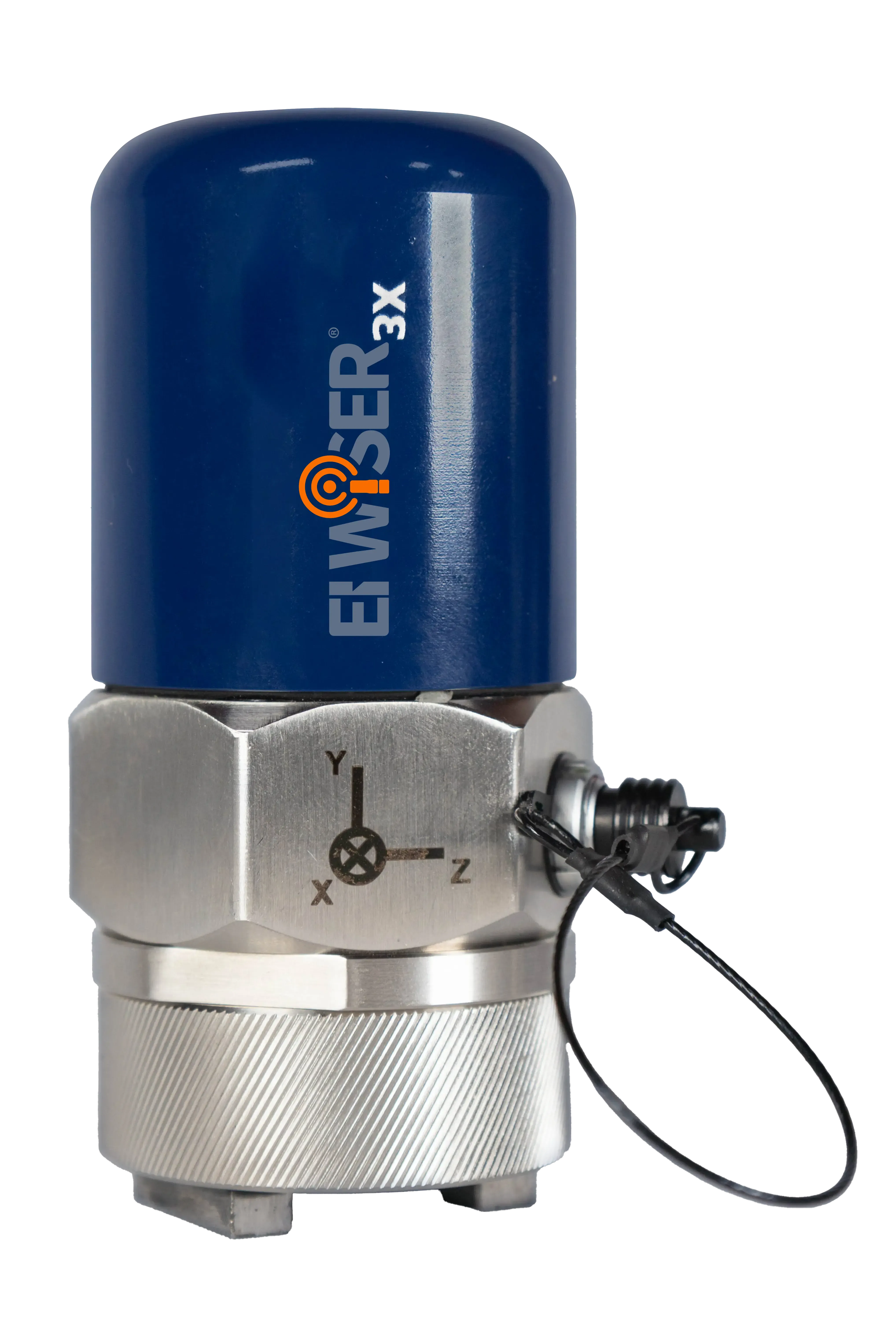
EI WiSER® 3X is a portable wireless triaxial accelerometer designed for vibration analysis. It sends three axes of vibration plus one additional channel simultaneously, over Wi-Fi, to a phone, tablet or laptop. The sensing element is an ultra-low-noise analog MEMS accelerometer with 10 kHz of bandwidth.
The same sensor serves three kinds of receiver: a mobile device running WiSER VIBE®, a Windows computer running Digivibe MX® and, through the WiSER Universal Receiver, vibration analyzers and balancing instruments from other manufacturers.
3 + 1
Axes plus one auxiliary channel
48 kHz · 24 bit
Sampling
IP67
Dust and water protection
Compatibility
Compatible devices and software
EI WiSER® 3X transmits over standard Wi-Fi, so the receiver is a device the analyst already carries. The four options below use the same sensor; they differ in where the data is analysed and stored.
Phone or tablet
WiSER VIBE®
iOS and Android. The sensor connects directly to the device over Wi-Fi. The app records and displays FFT spectra on four simultaneous channels, and runs both route and off-route collection. It is free to download.
Windows computer
Digivibe MX®
Tablet or laptop running Windows. Digivibe MX® provides the deeper analysis and the advanced balancing modes. It is purchased as a package with the sensor.
Third-party collector
WiSER Universal Receiver
The receiver pairs with the sensor and delivers four channels through BNC connectors to vibration analyzers and balancing instruments from other manufacturers.
Web browser
EI-Analytic™
Cloud storage, trending and remote access. Readings are uploaded from the measurement point, and a free 1 GB account is enough to build routes and store data.
Signal
Real-time vibration streaming over Wi-Fi
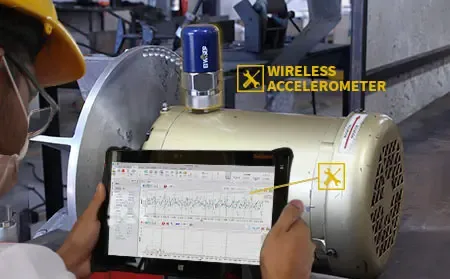
The sensor streams the vibration signal continuously, with a maximum delay of 0.2 seconds. The measurement is displayed while it is being taken, so a reading can be judged at the machine rather than after the route.
Because the signal is streamed rather than sent as a record of fixed size, resolution is set by the recording time and not by the instrument. Spectra of more than one million lines are possible, as are continuous recordings lasting several hours.
The signal is digitised at the sensor, at 48 kHz and 24 bits, and transmitted as a digital record. The result therefore does not depend on cable length or cable condition.
A fourth channel is available through the 5-pin connector for an optical sensor or a reference accelerometer, recorded simultaneously with the three vibration axes.
Mobile
Vibration analysis on a phone with WiSER VIBE®
With WiSER VIBE®, a phone or tablet works as the vibration analyzer. The app is available for iOS and Android, connects to the sensor directly over Wi-Fi and requires no receiver.
The app records and displays FFT spectra on four simultaneous channels. Routes are configured and collected in the same app, and readings can be sent to the EI-Analytic™ cloud from the measurement point.
WiSER VIBE® is free to download, and a free 1 GB EI-Analytic™ account is sufficient to build routes and upload data to the cloud.


On the route
Route-based data collection in a single recording
One recording yields acceleration, velocity, displacement and the acceleration envelope. Separate captures per parameter are not required, which shortens the time spent at each measurement point.
The power button on the sensor also starts and stops a capture. The sensor does not have to be released each time a new point is recorded, which saves time when collecting a route.
-
Place the sensor
The magnetic base holds the sensor on the measurement point. Where a 1/4-28 UNF stud is fitted, the sensor screws onto it.
-
Press the button
The button on the sensor starts the capture. The three axes are recorded in one placement.
-
Move to the next point
The reading is stored on the device and uploaded when a connection is available, so the route is completed either way.
A complete route, from setup to report, is described in wireless route-based vibration data collection.
Desktop and cloud
Desktop analysis and data sharing with Digivibe MX® and EI-Analytic™
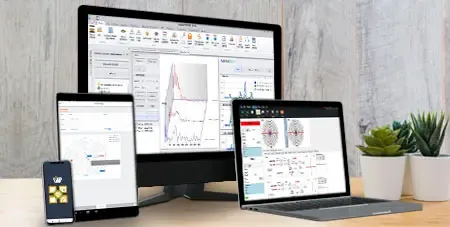
Digivibe MX® is the Windows software used with EI WiSER® 3X for deeper analysis. It runs on a tablet or laptop and is purchased as a package with the sensor.
Operating deflection shape (ODS) analysis is available on the phone and on the computer with the Digivibe MX® licence.
Measurements are shared through the EI-Analytic™ cloud or by e-mail, so a reading can be reviewed by an analyst who is not on site.
Existing equipment
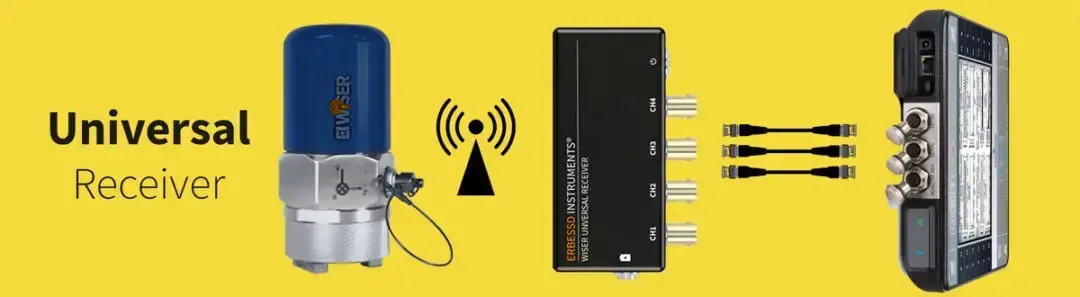
Use with third-party data collectors: WiSER Universal Receiver
The WiSER Universal Receiver connects EI WiSER® 3X to vibration analyzers and balancing instruments from other manufacturers. The receiver pairs with the sensor and delivers four channels of output through industrial BNC connectors.
The sensor can therefore be adopted alongside an analyzer that is still in service. The instrument already in use is retained.
EI WiSER® family
EI WiSER® 3X, 3X Mini and 1x compared
The EI WiSER® family consists of three portable accelerometers, which differ in the number of axes and in the wireless link. All three are used for route-based data collection.
✔ available · — not available
| Recommended EI WiSER® 3X | EI WiSER® 3X Mini | EI WiSER® 1x | |
|---|---|---|---|
| Measurement | |||
| Vibration axes | 3 | 3 | 1 |
| Auxiliary channel | ✔ optical sensor or reference accelerometer | — | ✔ optical sensor or second accelerometer |
| Bandwidth | 10 kHz | 10 kHz (X, Y) and 5.1 kHz (Z) in high range · 4 kHz (X, Y) and 1.8 kHz (Z) in high sensitivity | 10 kHz |
| Sensitivity | 100 mV/g | 100 mV/g | 100 mV/g |
| Dynamic range | ±20 g | 8, 16 or 32 g in high range · 2, 4 or 8 g in high sensitivity | ±20 g |
| Sampling | 48 kHz · 24 bits | Up to 25.6 kHz | 48 kHz · 24 bits |
| Connectivity | |||
| Wireless link | Wi-Fi | Bluetooth Low Energy 5.0 | Wi-Fi |
| Range | 20 m | 50 m | 20 m |
| Software | WiSER VIBE®, Digivibe MX® | WiSER VIBE® only | WiSER VIBE®, Digivibe MX® |
| Third-party data collectors | ✔ with the Universal Receiver | — | ✔ with the Universal Receiver |
| Construction | |||
| Power supply | 2 rechargeable Li-ion CR123 cells | CR2032 lithium coin cell | Rechargeable Li-ion CR123 cell |
| Protection grade | IP67 | IP67 | IP67 |
EI WiSER® 3X Mini is supplied in two versions, high range and high sensitivity. Where they differ, both values are given.
EI WiSER® sensors are portable instruments for an analyst’s route. Where simultaneous, synchronised acquisition from several points is required, for phase analysis or ODS, the permanently installed PHANTOM® sensors and the DEFIANT™ are the appropriate instruments.
Technical data
EI WiSER® 3X technical specifications
The values in the table are those of the published datasheet, which can be downloaded as a PDF.
| Sensor | Ultra-low-noise analog MEMS accelerometer, triaxial |
|---|---|
| Channels | 3 vibration axes + 1 auxiliary channel |
| Sensitivity (X, Y, Z) | 100 mV/g |
| Frequency range (±3 dB) | 0.5 Hz to 10 kHz |
| Dynamic range | ±20 g |
| Resonant frequency | > 25 kHz |
| Sample rate | 48 kHz |
| ADC resolution | 24 bits |
| Spectral noise (at 10 Hz) | 67 µg/√Hz |
| Wireless protocol | Wi-Fi 802.11, no receiver required |
| Operating distance (max) | 20 m, line of sight |
| Compatible devices | iOS, Android, Windows 10 or later, WiSER Universal Receiver |
| Compatible software | WiSER VIBE®, Digivibe MX® |
| Power supply | 2 rechargeable Li-ion CR123 cells, 3.7 V |
| Connector | 5-pin LEMO: charging, optical sensor, reference accelerometer |
| Protection grade | IP67 |
| Shock resistance | 5,000 g |
| Mounting | Magnetic base or 1/4-28 UNF stud |
| Operating temperature | −20 °C to 60 °C (−4 °F to 140 °F) |
| Storage temperature | −20 °C to 85 °C (−4 °F to 185 °F) |
Construction and mounting
The enclosure is rated IP67 to IEC 60529, for protection against dust ingress and against temporary immersion in water. The body is stainless steel.
The sensor is mounted on its magnetic base or screwed onto a 1/4-28 UNF stud, and withstands shocks of up to 5,000 g.
Power is supplied by two rechargeable Li-ion CR123 cells, charged through the same 5-pin connector that carries the fourth channel. The sensor enters standby mode when no receiver is detected.
Contents of the kit
The sensor is supplied as a kit, ready for use on a route:
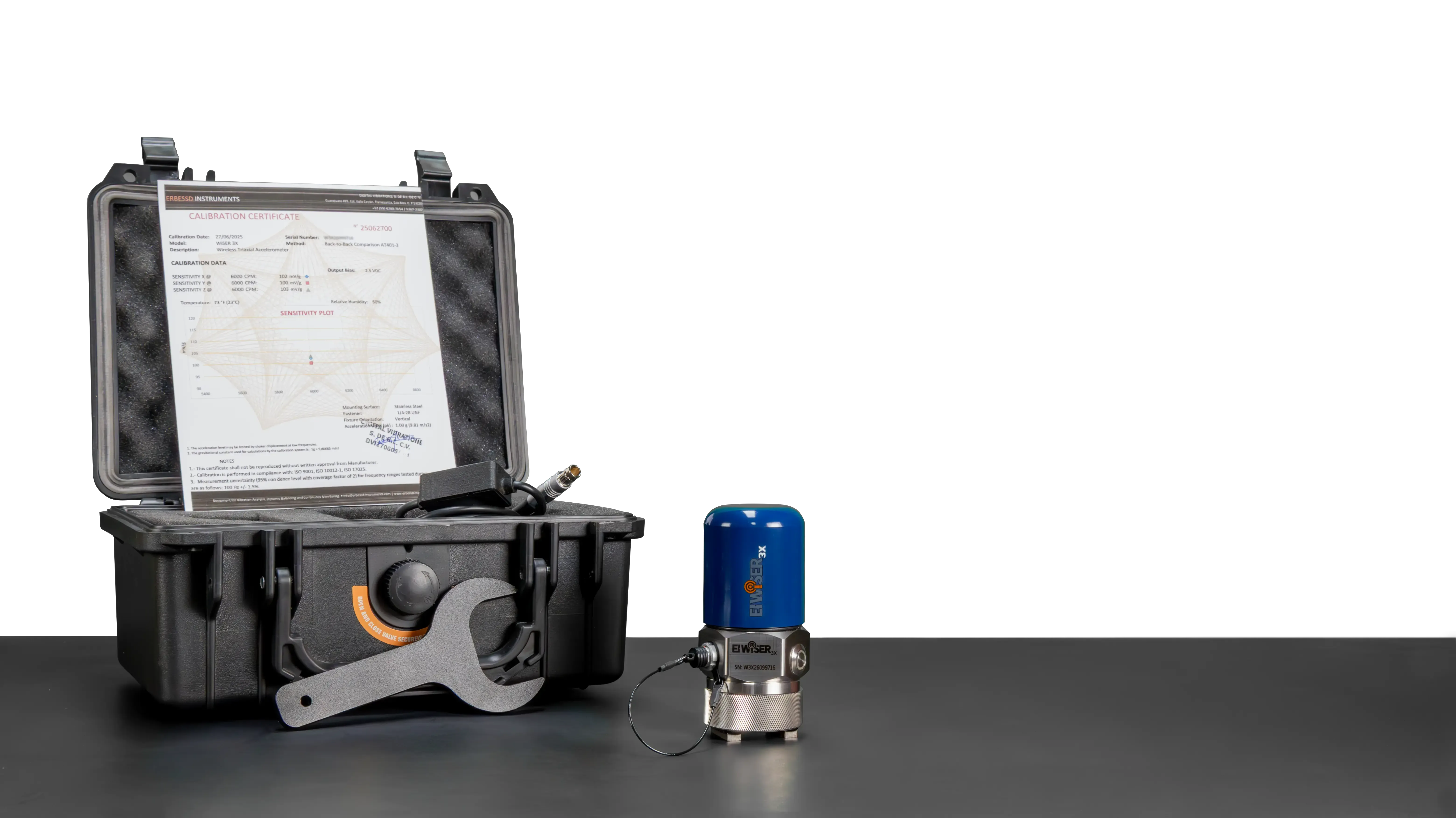
- EI WiSER® 3X sensor
- Magnetic base
- Pelican carrying case
- Charger, with batteries included
The kit on video
The unboxing video goes through the contents of the kit and the sensor itself. It is also published on its own page.
Field evidence
Field evidence: a UK power station and a comparative study
Salvtech, a UK engineering company, adopted EI WiSER® 3X for fan inspections at a power station. Its engineers are experienced vibration analysts and the company already owned vibration analyzers. It went on to purchase EI WiSER® 3X and Digivibe MX® M20.
It dramatically increased the number of readings we took during this visit as part of a day of fan inspections.
— Martin Christmas, Managing Director, Salvtech
In a 2025 comparative study, EI WiSER® 3X, PHANTOM® sensors and a wired interface gave comparable data when the readings were taken at the same points on the same machine, with the variance expected from differences in sensor resonance and mounting method. The study used a training simulator with known faults.
What users say
What EI WiSER® users say
[…] with the WiSER it was as simple as taking it out, connecting it to my phone, setting up the route and starting to take vibration readings. People there were delighted […]
Read the full excerpt (min 3:55–4:57)
A few months ago, after we purchased WiSER, I went to teach a vibration training course in Bonaire. The place where I taught it had a vibration instrument, and getting all the parameters into that instrument and running the practice sessions took a very long time; let’s say an hour and a half, two hours.
But with the WiSER it was as simple as taking it out, connecting it to my phone, setting up the route and starting to take vibration readings. People there were delighted; they started asking me for WiSER quotes.
We have a WiSER 3X + WiSER Vibe software. The sensor has saved us time collecting data […]

Ordering
Ordering options
Three ordering routes are available and the delivered sensor is identical in each. They differ in whether the analysis software is included and in who provides subsequent support.
Direct purchase
Buy the sensor online
Appropriate where the requirement is already defined. EI WiSER® 3X is listed in the online store, and the WiSER VIBE® app is free to download.
Sensor and software
Request a quotation with Digivibe MX®
Appropriate where desktop analysis or the advanced balancing modes are required. Digivibe MX® is purchased as a package with the sensor.
Distributor
Purchase through a distributor
Appropriate where local support in the customer’s language and time zone is required. The sensor is identical.
Frequently asked questions
Does the EI WiSER® 3X include software?
Yes — the EI WiSER® 3X includes WiserVibe. To have it with Digivibe MX® you buy the two together as a package.
Is the software really free?
Yes. WiserVibe is free and you can download it right now. The 1 GB EI-Analytic™ account is free too, and it is enough to build routes compatible with WiserVibe and upload data to the cloud.
Is Digivibe MX® included?
No — Digivibe MX® is bought as a package with the EI WiSER® 3X.
Can I balance with it?
Single-plane balancing is included. The advanced modes — two planes, three planes, the Balancing Wizard and the four-run (4-Run) method — need the Digivibe MX® licence, which unlocks them in WiserVibe as well.
Can I do ODS with the EI WiSER®?
Yes, on the phone and on the computer. It needs the Digivibe MX® licence.
How many lines of resolution does the EI WiSER® have?
There is no limit. Because it streams in real time, going past one million lines is straightforward — the constraint is how long you record, not the instrument.
How long does the EI WiSER® battery last?
8 to 14 hours of continuous recording. In normal route use, up to three days without recharging.
Is the EI WiSER® battery rechargeable?
Yes, with an adapter cable included in the box that plugs into the side of the sensor.
What wireless communication does the EI WiSER® use?
High-speed Wi-Fi. That is what allows continuous real-time streaming rather than scheduled packets.
How far does the sensor’s signal reach?
Up to 20 m, because the transmission is continuous rather than in bursts.
The EI WiSER® 3X Mini is a different sensor — it communicates over Bluetooth — and its range is 50 m.
Can I collect from several EI WiSER® at once?
Only with one mobile device per sensor, and the data would not be synchronised, so we do not recommend it.
If you need simultaneous, synchronised acquisition — for phase analysis or ODS — that is what the PHANTOM® sensors and the DEFIANT™ are for.
What happens if I lose the connection halfway through a route?
Nothing is lost: collection does not depend on the cloud. The data is stored on the device and uploads when there is signal again. You finish the route either way.
Can I capture RPM and process data during the route?
Yes. During the route you can capture RPM and log extra parameters — temperature, pressure, whatever you define — plus notes at the point, so the analysis does not depend on the collector’s memory.
What happens if a point cannot be measured?
It is marked as skipped, with its reason — machine stopped, point inaccessible — instead of leaving an unexplained gap in the trend.