In an IoT workspace, reliable connectivity is often more important than raw speed. PHANTOM® Gateways depend on stable wireless coverage to maintain communication. A WAVLINK WiFi extender can help eliminate dead zones and improve coverage, but proper setup is critical for IIoT performance.
Best Practices for IIoT Deployments
1. Place the Extender Strategically
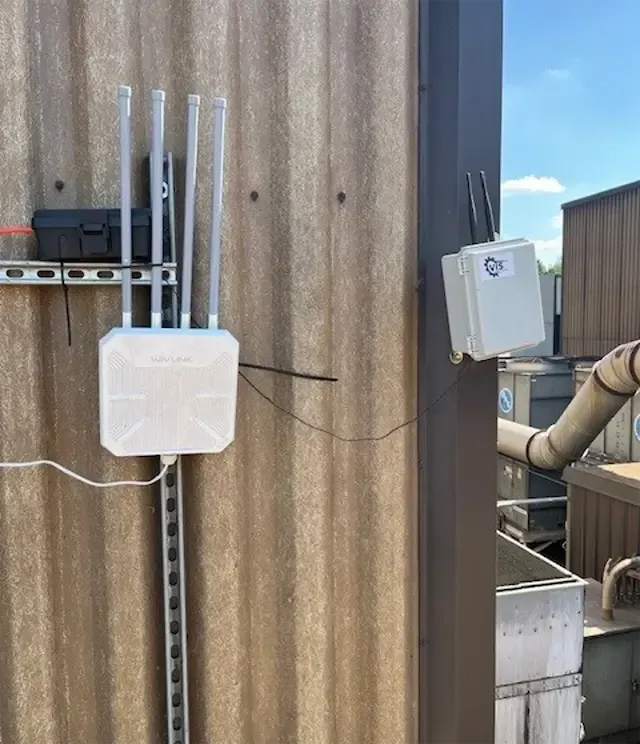
Install the WAVLINK extender midway between the main router and the PHANTOM® Gateways–not at the edge of the router’s signal range. WAVLINK recommends placing the extender where it still receives a strong signal from the primary router. Or connect the WAVLINK to the cellular modem via an ethernet cable.
2. Use the 2.4 GHz Band for Most IoT Devices
We recommend using only the 2.4 GHz band because it offers greater range and better wall penetration than 5 GHz. Reserve the 5 GHz band for higher-bandwidth devices such as cameras, workstations, or media equipment. Dual-band extenders support both frequencies for optimal traffic distribution.
3. Disable Smart Connect During Setup
If your router combines 2.4 GHz and 5 GHz networks under a single SSID (“Smart Connect” or band steering), some IoT devices may have difficulty connecting. WAVLINK recommends separating the bands into distinct network names when extender connectivity issues occur.
4. Lock WiFi Channels
Routers set to “Auto” channel selection may change channels automatically, which can disrupt communications between the extender and connected IoT devices. For improved stability, use fixed channels:
– 2.4 GHz: Channel 1, 6, or 11
– 5 GHz: Channels 35, 40, or 44
This can reduce interference and improve uptime for the PHANTOM® Gateways.
5. Keep Firmware Updated
Firmware updates often include security patches, performance improvements, and compatibility enhancements for newer IoT devices. WAVLINK specifically recommends updating firmware when troubleshooting unstable connections.
Ensure each PHANTOM® Gateway is set up as a “Main Gateway” and not as a Repeater.
Quick Troubleshooting Tip
If PHANTOM® Gateways frequently disconnect:
- Verify the extender is receiving a strong signal from the main router
- Ensure DHCP, MAC filtering, or access-control restrictions on the router are not blocking the extender
- Restart the extender and reconnect the Gateways
Bottom Line
A properly configured WAVLINK WiFi extender can significantly improve PHANTOM® network reliability by extending coverage, reducing dead zones, and providing dedicated connectivity for unattended Gateways operating in hard-to-reach areas. For the best results, prioritize signal quality, use 2.4 GHz for IoT endpoints, and maintain fixed channel settings to minimize interference.
Summary: In IIoT environments, a stable connection beats a fast connection. Optimize your WAVLINK extender for coverage and consistency rather than maximum throughput. Or as my friend Ken Starry says: “Slow is Smooth and Smooth is Fast.”